 eIDPlugin
eIDPlugin
eIDPlugin
A plug-in for FileMaker Pro on macOS and Windows that reads the contact chip of the Belgian identity card through an ordinary card reader. Surname, given names, date and place of birth, gender, address with postal code and municipality, nationality, card number, expiry date, national register number and the photo — in one function call, as JSON.
Written for FileMaker developers. One calculation in your script and the fields are filled in. No OCR, no photographs of cards, no retyping — not at the counter, not at reception, not at a sign-up desk.
Download free Buy a licence € 99 one-off, VAT included · every Mac and PC in your company
Ten free minutes per start of FileMaker — no registration, no trial key.
A Mac or PC, FileMaker Pro and a card reader costing about fifteen euro. Nothing else: the plug-in talks to the reader directly and needs no internet, no server and no account.
macOS 12 Monterey or newer, on Apple silicon and on Intel. Or Windows 10 or 11, 64-bit. Both use the card reader layer built into the operating system — PCSC on the Mac, PC/SC on Windows.
On the Mac — macOS 12 Monterey or later — tested on seven versions: FileMaker Pro 26 (2026), 22 (2025), 21 (2024), 20 (2023), 19, 18 and 17. On Windows, tested on FileMaker Pro 22 (2025). Built against the Claris Plug-In SDK 26, and works back to the version 15 plug-in API.
Any PC/SC reader your system recognises. Tested with the Sitecom MD-1002 and the Xssive CR02, both around € 15.
The Belgian eID, old or new model. The contact chip is read, so the card goes into the reader rather than against it.
Those seven versions were each tried on a Mac, not inferred from a table. Do note the difference between the two requirements above: the FileMaker version may be old, the macOS version may not — the plug-in needs macOS 12 Monterey or newer. Running FileMaker 17 on a Mac of the same vintage means it is the operating system standing in the way, not FileMaker.
Not sure whether it will work for you? Install the plug-in and call EID_Readers. If you see the name of your reader, the rest works too. That takes five minutes and costs nothing.
The plug-in is an ordinary free download. Nothing is left out, there is no cut-down trial edition, and you need no account and no trial key. What you download is the complete plug-in.
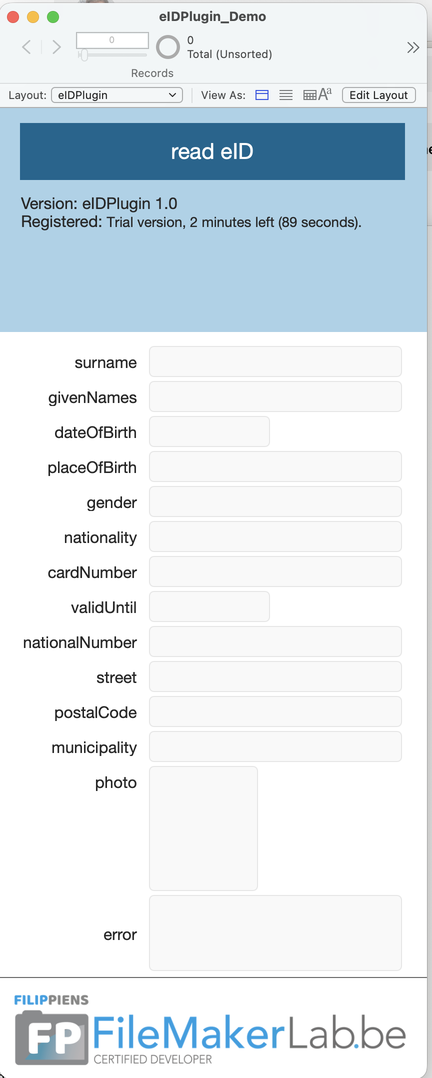
Open eIDPlugin_Demo.fmp12 from the download, put a card in the reader and click read eID. That is the quickest way to see whether your reader works.
On a Mac: put macOS/eIDPlugin.fmplugin into ~/Library/Application Support/FileMaker/Extensions/. On Windows: put Windows/eIDPlugin.fmx64 into the Extensions folder next to FileMaker Pro. Then quit FileMaker completely and start it again — a plug-in is only loaded at startup.
Without a key, EID_Read reads cards for ten minutes, counted from the start of FileMaker. After that it returns a plain error message, and restarting FileMaker gives you another ten minutes. Nothing is stored on your disk.
EID_Readers, EID_Version and EID_License keep working without a licence. So you can check that your card reader is recognised before you buy anything.
The download appears here as soon as the first release is ready. Want to try it now? Send an e-mail to info@filemakerlab.be.
What you buy is therefore not the software but the removal of those ten minutes. If it does not suit you, delete the file and you have lost nothing.
The download includes eIDPlugin_Demo.fmp12: a FileMaker file with all the fields, one button and the script you saw above. Card in the reader, click, done — you do not have to build anything to find out whether it works. It also shows the version and how much trial time is left.
Put the .fmplugin in the Extensions folder and restart FileMaker. The five functions then simply appear in the calculation dialog.
Card in the reader, then call EID_Read from your script. The plug-in talks to the reader directly and returns one JSON.
Take what you need with JSONGetElement. The photo arrives as base64 and goes straight into a container field with Base64Decode.
Always JSON, errors included, and always with an error field. That way your script only ever has to know one shape: if error is empty, use the rest. The keys speak for themselves: surname, givenNames, nationalNumber for the national register number, cardNumber for the card number and photo for the portrait.
{
  "error": "",
  "cardNumber": "592-1234567-89",
  "surname": "PIENS",
  "givenNames": "FILIP",
  "dateOfBirth": "08.08.1964",
  "placeOfBirth": "GENT",
  "gender": "M",
  "nationality": "Belg",
  "validUntil": "09.03.2032",
  "nationalNumber": "64080812345",
  "street": "Waregemsesteenweg 80",
  "postalCode": "9770",
  "municipality": "Kruisem",
  "photo": "/9j/4AAQSkZJRgABAQ…"
}

// and on failure, the same shape:
{
  "error": "There is no card in the reader.",
  "errorDetail": "0x8010000C"
}
Set Variable [ $json ; EID_Read ]

If [ JSONGetElement ( $json ; "error" ) ≠ "" ]
    Show Custom Dialog [
        JSONGetElement ( $json ; "error" ) ]
    Exit Script []
End If

Set Field [ eIDPlugin::surname ;
    JSONGetElement ( $json ; "surname" ) ]
Set Field [ eIDPlugin::givenNames ;
    JSONGetElement ( $json ; "givenNames" ) ]
Set Field [ eIDPlugin::street ;
    JSONGetElement ( $json ; "street" ) ]
Set Field [ eIDPlugin::postalCode ;
    JSONGetElement ( $json ; "postalCode" ) ]
Set Field [ eIDPlugin::municipality ;
    JSONGetElement ( $json ; "municipality" ) ]

// the photo straight into a container field
Set Field [ eIDPlugin::photo ;
    Base64Decode (
        JSONGetElement ( $json ; "photo" ) ;
        "photo.jpg" ) ]
This is literally the script from eIDPlugin_Demo.fmp12, the example file that comes with the download. The field names are the same as the JSON keys, so there is nothing to translate. Note the check on error at the top: without it, a failed read fills an empty record and you never notice.
The data arrives cleaned up, not as the card delivers it. The chip pads fields with spaces and null bytes, writes the date of birth as 08 AUG 1964, and after a municipal merger appends the former municipality to the street name: Waregemsesteenweg(KRU) 80. That is for the postal service, not for a customer database — and it breaks your finding, sorting and de-duplicating. The plug-in strips it out and puts the date of birth in the same shape as the expiry date.
EID_Read( { reader } )Reads the card and returns every field as JSON, with the photo as base64. Without an argument the first reader is used.
EID_ReadersThe connected card readers, one per line. Empty means the system sees no reader — the first question with any problem.
EID_VersionThe version of the plug-in, useful in an error message or an about screen.
EID_Register( key )Activates the licence for this session. One argument: the key carries the name it was issued to.
EID_LicenseThe licence state in plain language — who it is registered to, or how much trial time is left.
Call EID_Read from a script, behind a button. Every call is a full conversation with the chip and takes about a second. In a calculation field, an unstored calculation or a Data Viewer watch the card is therefore read over and over, and that makes FileMaker crawl. The other four functions are cheap and may be used anywhere.
The plug-in talks to the card reader directly. No server, no API, no account, no internet connection. The data goes from the reader into your file and nowhere else. Under the GDPR that saves you a processor and a processing agreement: no third party ever sees the identity data of the people at your counter.
The same code that runs in eIDRent against real cards, including the correction that truncated the photo there. Not a fresh implementation of the BELPIC protocol.
Errors come back as JSON too, with the same error field. Your script never has to know two formats, and an empty reader is a state of the counter, not a calculation error.
The licence is issued to your company and works on every machine you install it on, Mac or Windows. A new machine or a reinstall changes nothing.
Ten minutes per start of FileMaker, without a key and without registering. Enough to see whether your reader joins in and whether you like the result.
Through Settings → Plug-Ins → Configure, once per machine. Or with EID_Register in your startup script, if you would rather ship the key inside the solution.
Any PC/SC reader your system recognises will do. These two are tested and together cost less than an hour of your time.
Already have an eID reader from your bank or your accountant? Just try it: call EID_Readers and see whether it appears in the list.
The plug-in reads a card that sits in a reader, so it belongs on the machine where somebody is standing at the counter. On FileMaker Server or in WebDirect there is no reader, and so nothing to read.
FileMaker Go does not load plug-ins — that is a limitation of FileMaker itself. For iPhone and iPad there is eID 2 FMP, a separate app that reads the card and passes the data on.
The contact chip is read, so the card goes into a reader. That is deliberate: it works with cards from before 2020 as well, and you need no CAN number.
Belgian identity cards only. A passport carries a very different kind of chip, one an ordinary card reader cannot reach. Driving licences neither.
One more thing to know, because your customers will ask: the national register number is in the result. It is an identification number you need a legal basis to store. Passing it through is one thing; letting it land unnoticed in every customer database is another. If you would rather not have it, simply ignore that field in your script.
You get a key issued to your company. Paste it into Settings → Plug-Ins → eIDPlugin → Configure and it works at once — no restart needed.
You enter your company details on the order page — they go on your invoice. You get the key right after payment.
Continue to paymentBancontact · Visa · Mastercard
Thank you
To install: in FileMaker Pro go to Settings → Plug-Ins → eIDPlugin → Configure, paste the key and click Save. It applies immediately, and you only need to do this once per machine.
We have also e-mailed this key to you.
One moment
Checking your payment…